

If your Google Ads leads cost more than they should, the budget is rarely the problem. The account is usually leaking money in places nobody checks. This framework shows you how to lower cost per lead on Google Ads by fixing things in the right order: tracking first, wasted clicks second, landing page third, bidding last. Most businesses work backwards, change a bid and wonder why nothing improved. Follow the sequence and you’ll know what each lead costs, why it costs that, and which levers move it. It’s written for owners and marketing leads who want straight answers, not account jargon. Every step is something you can check in your own account this week, with or without an agency.
What is cost per lead on Google Ads?
Cost per lead is your total ad spend divided by the leads those ads produced. Spend €2,000, get 40 enquiries, and each lead cost you €50. Google Ads reports a version of this as cost per conversion, and that number is only as honest as your definition of a conversion.
If a form submission, a phone call and a scroll down the page all count equally, the figure on your dashboard tells you very little. Step one below fixes that.
What is a good cost per lead on Google Ads in Ireland?
A good cost per lead is one your business can afford once you know how many leads become customers and what each customer is worth. There’s no single Irish figure, because a solicitor, a solar installer and a plumber compete in completely different markets. Treat any benchmark quoted without a named source with suspicion.

Work backwards instead. Say one lead in five becomes a customer, and each customer brings you €1,000 in gross profit. You can pay up to €200 per lead and break even. Your target should sit comfortably below that. It’s how our Google Ads management in Dublin starts: a target cost per acquisition agreed before the campaign launches, not discovered after the budget’s gone.
Why is my cost per lead on Google Ads so high?
Almost always it’s one of four things. Your tracking counts the wrong actions. You’re paying for clicks from people who never wanted what you sell. Your landing page loses the people who did. Or your bidding is chasing the wrong signal. Most accounts have at least two of these running at once. Each one is fixable, and fixing them is how you lower your cost per lead.
You can usually spot the culprit in ten minutes. Open the search terms report and read what people actually typed. Then open your landing page on your phone and try to make an enquiry. If the search terms look off, you’ve got a click problem. If they look right and few people enquire, you’ve got a page problem.
How do you lower cost per lead on Google Ads?
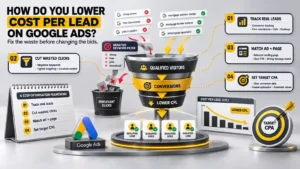
Fix your conversion tracking so Google counts real leads, cut irrelevant clicks with negative keywords and tighter targeting, send each ad to a page that matches its promise, then set a target CPA once the data is clean. Keep that order. Bids rarely cause a high cost per lead. Wasted clicks and weak pages do, so lowering your cost per lead starts there.
Step 1: Fix your conversion tracking
Google’s bidding learns from the conversions you report. Its own documentation says Smart Bidding learns across every action in the Conversions column. So if a button click or a page view sits alongside form submissions, the system hunts for cheap, easy actions. Your cost per lead looks brilliant while enquiries dry up.
Make form submissions, calls and bookings your primary conversions. Demote everything else to secondary, where it’s reported but doesn’t steer the bidding. Then submit a test enquiry and check it shows up in the account before you touch anything else.
Step 2: Stop paying for the wrong clicks
Read the search terms report every week. Anything irrelevant becomes a negative keyword. For most service businesses that means words like jobs, free, DIY, course and salary. Tighten match types wherever broad matching pulls in loosely related searches.
Check your location settings too. Google’s default includes people who’ve shown interest in a place, not only people physically in it. If you serve Dublin and the surrounding counties, don’t target the whole country because it’s one click in the settings. And if nobody answers the phone after six, stop paying for call ads after six.
Step 3: Match the ad to the page
Send each ad group to a page that repeats the promise in the ad. Sending everything to the homepage is a classic and costly mistake. Landing page experience affects what you pay per click, so a closer match tends to lower your click costs as well as lift your conversion rate.
Then strip the page down. One clear action, a phone number visible on mobile, a form with only the fields you need to qualify the lead, and proof near the button. If the page needs rebuilding, our website design team can do that alongside the ads.
The message matters as much as the page. On a Meta campaign for Stillorgan Group, we took cost per lead from around €59 to under €12 with the same platform and the same lead objective. The change was better creative that answered the worries customers actually had. Search ads follow the same logic. The message decides who clicks and who enquires.
Step 4: Set a target CPA once the data is clean
Target CPA tells Google the average you want to pay per conversion. Where a campaign has history, Google recommends a figure based on the average CPA from the last 30 days, adjusted for conversion delays. Start there, or near your current average, then step the target down gradually. Cut it sharply and the campaign tends to lose volume, so you save on cost and lose the leads.
Lowering cost per lead through bidding alone rarely works, and it’s the step most people try first. Give each change enough conversions to read before you judge it. Changing three things in a week tells you nothing about which one worked.
Is a cheaper lead always a better lead?
No. Cost per lead is a starting point, not the finish line, and lowering it at the expense of lead quality defeats the purpose. Compare two campaigns. One delivers leads at €30, and one in twenty becomes a customer, so each customer costs €600 in ad spend. The other delivers leads at €60, one in six converts, and each customer costs €360. The dearer lead wins.
Ask whoever answers the enquiries to tag each one as qualified, junk or won. Better still, feed that back into Google Ads so the bidding learns what a good lead looks like. That’s the kind of thing plain-English reporting should show you without a spreadsheet marathon.
How long does it take to lower cost per lead on Google Ads?
Lowering your cost per lead isn’t instant. Tracking fixes and negative keywords can show up within a couple of weeks, because they change who sees your ads straight away. Landing page and bidding changes take longer, because Google needs fresh conversions to learn from. On a small account with only a handful of leads a month, change one thing at a time and wait for the data.
If you’d rather have someone else do the work, have a short call with us. We’ll look at the account and tell you honestly whether we’re the right agency. If we are, you’ll see a first-90-days plan before you sign anything.